Bald filterBald filter for photos
Bald filter for photos: make any picture bald in seconds
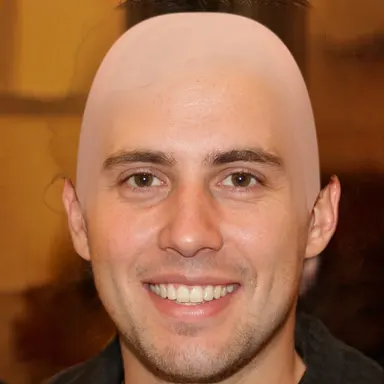
Pick a photo and bald-filter.com removes the hair and rebuilds a smooth, shaved skull in a few seconds. Try it on a selfie, a friend, a family picture or an old photo of your dad. Everything happens in your browser: the photo is never uploaded, there is no account and no credit to buy, and this page does not even ask for your camera.

Would you look good bald?
- Real time
- 100% private
- Free, no sign-up
How to make a photo bald
- 1
Choose a photo
Tap the button at the top of this page or drop an image on it. JPG, PNG and WebP work, and so do the photos in your iPhone or Android gallery.
- 2
Wait a few seconds
The AI finds the face, removes the hair, rebuilds a 3D skull lit like the rest of the picture and fills in the background behind it.
- 3
Save or share
Tap the shutter button to open the result, then save it or share it straight to WhatsApp, Instagram, TikTok or Snapchat.
Which photos work best
A visible face
Facing the camera or turned three-quarters. A pure side profile is not detected, because the AI needs to see both eyes.
Even light
Daylight or soft indoor light gives the most natural skull. Strong backlight or a hard flash leaves less detail to light it from.
Hair off the face
Short and medium hair disappear cleanly. Very long or voluminous hair is harder: pick a photo where it is tied back or behind the shoulders.
One person at a time
The filter works on one face per photo. For a group picture, crop it around the person first.
Photo or live camera?
A photo is the way to go for other people: a friend, a parent, a celebrity, or yourself in a picture you already love. It also works when you would rather not turn on your camera.
To judge whether a shaved head suits you, the live camera is better: you see yourself bald from every angle, in motion, and you take the photo when you like the look. It is on the home page, one tap away.
Ideas to try
Preview your future
Hair loss in the family? Try a recent selfie and see the shaved look before it decides for you.
Prank the group chat
Make your friends bald and drop the pictures in the group. Ask before posting them publicly.
Before the big chop
Thinking of shaving it all off? Compare the before and after side by side and show your barber.
Old family photos
Scanned prints work too, as long as the face is sharp. Grandpa bald at twenty is a guaranteed laugh.
Your photo stays on your device
Most online bald filters upload your photo to a server and run generative AI on it. That takes time, often asks for an account or credits, and the AI redraws the whole face, so the result no longer quite looks like the person.
bald-filter.com works the other way round. The AI runs inside your browser, the picture never leaves your phone or computer, and only the hair changes: the face, the expression and the background stay as they were.
Frequently asked questions
How can I make a picture bald for free?
Open this page, tap the photo button and pick an image. bald-filter.com makes the person bald in a few seconds, for free, with no app and no account.
Is my photo uploaded?
No. The photo is processed in your browser, on your device. Nothing is sent to a server and nothing is kept once you close the page.
Why is no face detected?
The face is probably too small, too dark, seen from the side or partly hidden. Try a photo where the face is larger, facing the camera and well lit.
Can I make someone else bald?
Yes, any photo with a clear face works: a friend, a family member or a celebrity. Keep it friendly, and ask before posting a picture of someone else.
Can I see myself bald live instead of on a photo?
Yes. The home page opens your camera and shows you bald in real time, with your movements and your light. You can take a photo there.
Would you look good bald?
- Real time
- 100% private
- Free, no sign-up
More guides
Bald filter for webcam, Zoom and OBS
Put a live bald filter on your webcam for Zoom, Google Meet, Teams or Discord, free in your browser with OBS Virtual Camera.
Bald filter on TikTok, Instagram and Snapchat
The bald filter on TikTok, Instagram and Snapchat: what it's called, where to find it, and a realistic one to post anywhere.
Would I look good bald?
Would a shaved head suit you? Check your face shape, skull, beard and skin, then see yourself bald live with a free filter.
Bald with a beard: styles and tips
Shaved head and beard: the styles that suit each face shape, how to balance the two, and how to see the look on you.
Shaved head for women
Thinking of shaving your head? Face shapes, buzz cut lengths, what to expect, regrowth, and a free filter to see it first.
How to shave your head
Shave your head at home with clippers and a razor: tools, steps, the back of the head, mistakes to avoid and aftercare.
How to take care of a bald head
Shave your head without cuts or bumps, stop it shining or flaking, protect it from sun and cold, and know how often to shave.
Am I going bald? Signs and what to do
Receding or mature hairline, thinning crown, shedding: how to tell if you are going bald, and your options at each stage.
Hair care: keep your hair healthy
The habits that protect your hair, hair loss myths, early signs of balding and the treatments that actually work.
Hair regrowth products that work
Minoxidil, finasteride, ketoconazole, laser caps, rosemary oil, biotin: what regrows hair and how long it takes.
Hair transplant or shaved head?
Hair transplant (FUE, FUT, DHI): cost, recovery month by month, who it suits, and when shaving your head is the better call.