Bald filterCapCut bald filter alternative
CapCut bald filter: how the templates work, and a live alternative
Search "bald" in CapCut and you get dozens of templates, from "Bald filter" to "Bestie I'm bald". They are behind many TikTok bald trends, but they are video templates, not a live camera filter. Here is how they work, what to watch out for, and how to see yourself bald live instead.

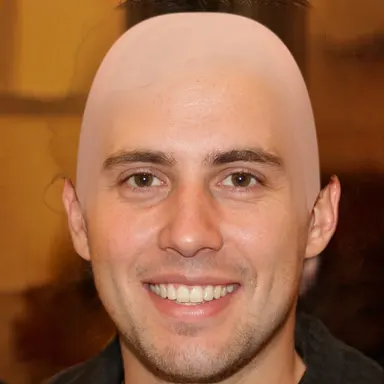
Would you look good bald?
Turn on your camera and watch your hair vanish, live. Nothing leaves your device.
Make me bald- Real time
- 100% private
- Free, no sign-up
How CapCut bald templates work
A CapCut template is a ready-made video made by another user: you pick one, add your photo or clip, and CapCut builds the result. Search for "bald" in the templates, tap Use template, then pick your photo.
Templates that change your face use CapCut's AI, which processes your photo on its servers. Dreamina, CapCut's sister site, also has an AI bald filter that generates a new image from your photo and uses credits.
What to know before you use it
A video, not a mirror
You can't see yourself bald live: you upload a photo and wait for the render.
Many templates are memes
Lots of bald templates are joke videos, not a realistic preview of your head.
Account and Pro
Many AI features need a CapCut account, and some templates or exports need CapCut Pro.
Your photo is uploaded
AI templates send your photo to CapCut, whose terms grant it a broad license to what you upload.
CapCut vs bald-filter.com
| CapCut | bald-filter.com | |
|---|---|---|
| Live camera | No, upload then render | Yes, in the browser |
| Account | Often required | None |
| Your photo | Sent to CapCut for AI templates | Stays on your device |
| Result | A ready-made video | A photo to save or share |
| Price | Free, some features Pro | Free |
| Availability | Blocked in some countries, like India | Any browser |
See yourself bald live, then make the video
bald-filter.com shows the bald look on your camera in real time, so you can check the angle and the light before taking the photo. Then drop the photo into CapCut, or any editor, to build your bald reveal.
- 1
Open bald-filter.com
No app and no account: open the page and allow the camera.
- 2
Take the bald photo
Turn your head until the angle looks right, then tap the shutter button.
- 3
Edit it in CapCut
Save the photo and add it to a CapCut project, next to a photo with your hair, for a before and after.
Frequently asked questions
Is there a bald filter on CapCut?
There are many bald templates made by users, such as "Bald filter" or "Bestie I'm bald". You add a photo and CapCut builds a video from it.
Is the CapCut bald filter free?
Many templates are free, but some features need CapCut Pro and many AI features need an account. bald-filter.com is free, with no account.
Does CapCut upload my photo?
AI templates process your photo on CapCut's servers. bald-filter.com processes everything on your device: nothing is uploaded.
Can I use a bald-filter.com photo in CapCut?
Yes. Save the photo, then import it into CapCut like any other image.
Would you look good bald?
Turn on your camera and watch your hair vanish, live. Nothing leaves your device.
Make me bald- Real time
- 100% private
- Free, no sign-up
Other alternatives
Snapchat bald filter alternative
The Snapchat bald filter is called Bald Character. Where to find it, its limits, and a realistic filter without the app.
Instagram bald filter alternative
Instagram's bald filters vanished with Meta Spark in 2025. What is left, and a free live bald filter to post your photo.
TikTok bald filter alternative
How to find a bald filter on TikTok, why the effects keep disappearing, and a realistic live bald filter that works anywhere.
YouCam bald filter alternative
YouCam's bald filter needs an upload, an account and credits. A free bald filter that works live, with nothing uploaded.
ChatGPT and Gemini bald photo alternative
ChatGPT and Gemini can make a photo bald, but they upload it, cap free tries and can change your face. A live alternative.